Overview
A browser based arcade with a walkable 3D arcade hall and a 2D version of every game. No install, just play.
To get the 3D experience, you need to use your laptop for desktop browser. If you access it from a mobile device, you'll still get the games, but they'll be flat, 2D games with no arcade or 3D arcade cabinets.
ALL games are rewrites in JavaScript. There are no virtual machines or emulators here.
The games are based on a game engine I created to easily make 80's style classic arcade video games. It implements timed loops timed on NTSC video sync, has an audio engine for FM audio generation where you can plug in parameters for your target hardware or use presets for existing 80's sound hardware, sprite animations, collision detection, etc...
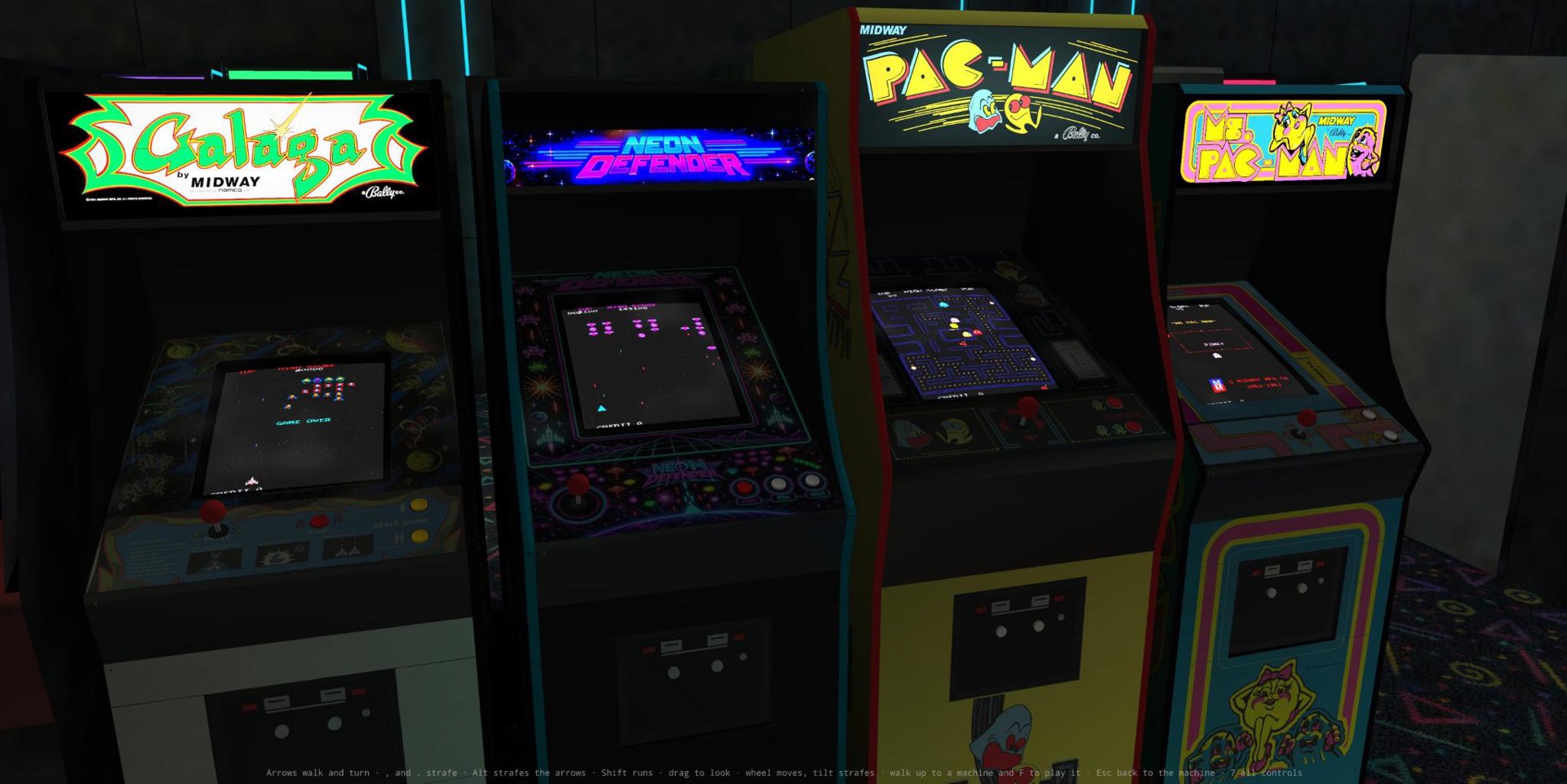
The 10 video games are modern rewrites in JavaScript. One of the games in the arcade is my own -- Neon Defender. You'll find it in the row of machines to your right, to the right of Pac-Island and 2 of them inside Quinn's Irish Pub (to your left, when you walk into the Arcade).
Each game is in its own stand up arcade cabinet or cocktail table sit-down cabinet. They're rendered in 3D with photo-realistic pre-baked renderings. The CRTs in the machines have curved surfaces with reflections, imperfections on blur, low contrast, fading, scan lines, and the top glass over the CRTs has its own imperfections of scratches and smudges. The art work on the flat surface just under the glass and on the player control panel has aged edges. All these imperfections are controllable, per machine. There are ambient arcade noises that you can control too. You can hit the "E" or "O" keys to get menus for these settings amoung other things.
Each game has a service menu when you hit tab where you can control things such as the dip switches to control how many lives you get for a quarter, how many points to a bonus life, playback recordings of games, download or upload your recordings (all recordings are saved automatically to your local browser storage, never on any server. Downloading it just copies it from your local browser to a local file. Uploading is similar. When a recorded game is being replayed, you can interject and continue playing the game from that point.
Easter Egg!
There's a secret room in the arcade that is locked. Use the terminal to the right to log in. You'll need the password, but I'm not telling you what it is. If you're Gen-X you already know the password. For a hint, look at the floor in front of the arcade entrance that you arrived through.
If you still don't know, just ask your favorite AI what the PW is while giving it the hint you found. It'll know.
Why I Decided to Make This
I've been a fan of Pac-Man ever since it came out. And I've been a fan of videos games since before then and continue to be a fan to this day.
History
In 1982 when I took my first computer course as a kid, I attempted to recreate Pac-Man. It was only a 2 week course, so of course, I did not finish. That was on an Atari 400 PC at the time. A year later I got my first home computer... a Franklin Ace 1000, which was an Apple // clone. I played around with trying it in BASIC but BASIC on that hardware was too slow and the graphics hardware was simply not good enough nor was the audio hardware. Somewhere between 1987 and 1991 I started creating Ms Pac-Man on my 16 bit Apple ][GS. It had the speed and the hardware. I was creating it in Assembly language. I made some progress, but abandoned it because of time.
Now with AI, the time barrier no longer exists. With Claude Code, I was able to recreate Pac-Man as well as an entire 3D interactive arcade.
Future Plans
I'll be adding more games, more rooms to the arcade, and will likely add online competition and maybe some message boards. Just spit-balling at the moment.
Setting Up Your Game
An example of setting up your game using my game engine. I'll publish the engine once I've polished it up.
<canvas id="game" width="224" height="288"></canvas>
<script src="arcade.js"></script>  <!-- the package's global build; in this repository src/engine/engine.js -->
<script>
  const { screen: makeScreen, rgb, rect, text, fonts } = ARCADE.gfx;
  const screen = makeScreen(224, 288);
  screen.attach(document.getElementById('game'));

  // A font is { w, h, glyphs }: one bitmask a row, the leftmost pixel the highest of w bits
  fonts.tiny = { w: 4, h: 5, glyphs: { H: [0b1010, 0b1010, 0b1110, 0b1010, 0b1010], I: [0b1110, 0b0100, 0b0100, 0b0100, 0b1110] } };

  let x = 0;
  function frame() {
    screen.fill(rgb(0, 0, 32));
    const pic = screen.picture();
    rect(pic, x, 140, 16, 16, rgb(255, 255, 0));                  // a yellow block crossing the screen
    text(pic, fonts.tiny, 'HI', 100, 120, rgb(255, 255, 255), 3);  // "HI" at three times size
    screen.present();
    x = (x + 1) % 224;
    requestAnimationFrame(frame);
  }
  frame();
</script>
Quick Start
When you approach an arcade game in the 3D arcade, hit "F" on your keyboard to lock into that machine.
Press "?" for a list of keys and what they do.